Part of the Luxon Family
LuxonLink — Internal AI knowledge base software
LuxonLink. No searching. Just answers.
Turn your company documents into a controlled, auditable AI knowledge base that gives employees cited answers — with full visibility into what’s working and what’s missing.
More than answers — LuxonLink shows you how your knowledge is used and where it needs improvement.
Company document Q&A with citations
LuxonLink connects your company’s documents and turns them into a system employees can query in plain English.
Instead of searching through folders, policies, and PDFs, employees get direct answers backed by source citations.
How LuxonLink works
Step 1: Ingest your documents
Upload PDFs, DOCX files, spreadsheets, and other internal content. LuxonLink processes and indexes your documents so they can be searched and answered against.
Step 2: Ask questions
Employees ask questions naturally without needing to know where information is stored. LuxonLink finds the relevant content across your indexed documents.
Step 3: Get cited answers
Responses are grounded in your documents, with citations showing exactly where the answer came from. Every answer is verifiable and traceable to the source.
Watch the LuxonLink overview
A short overview of how LuxonLink helps teams skip searching and get answers from approved documents.
See LuxonLink in action
LuxonLink includes the user-facing assistant plus the admin controls needed to manage documents, tune retrieval, customize the experience, and review reporting.
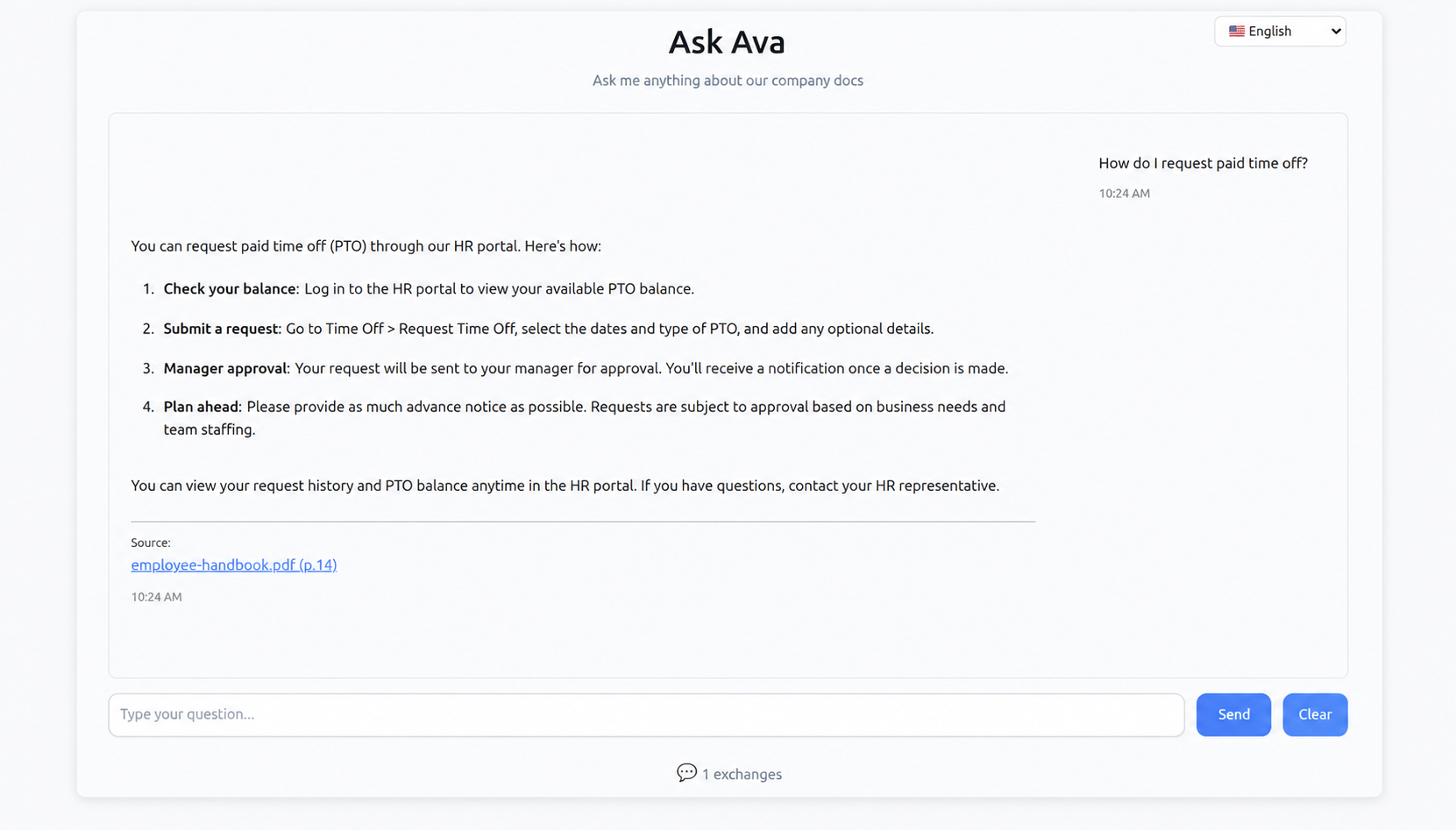
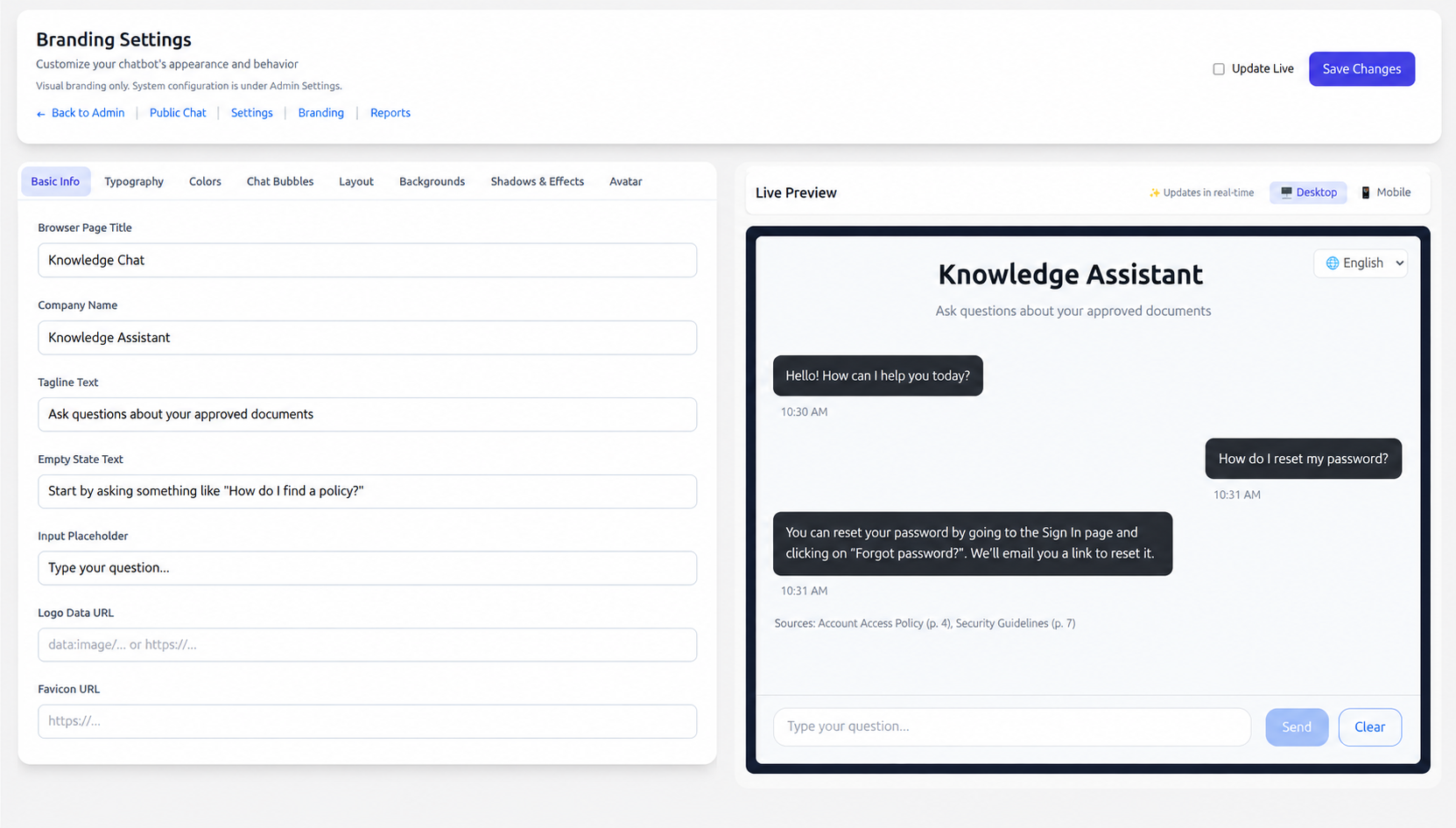
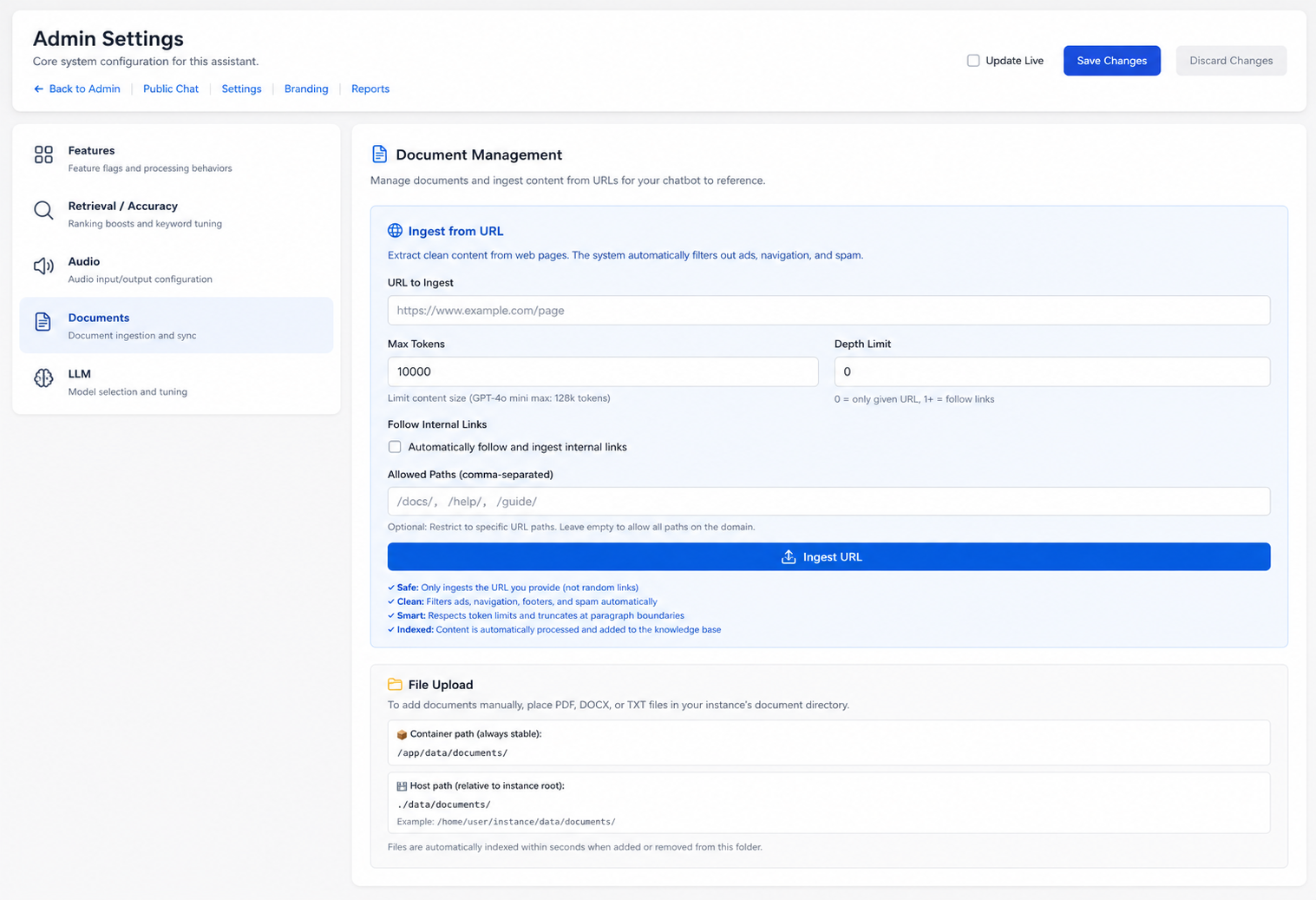
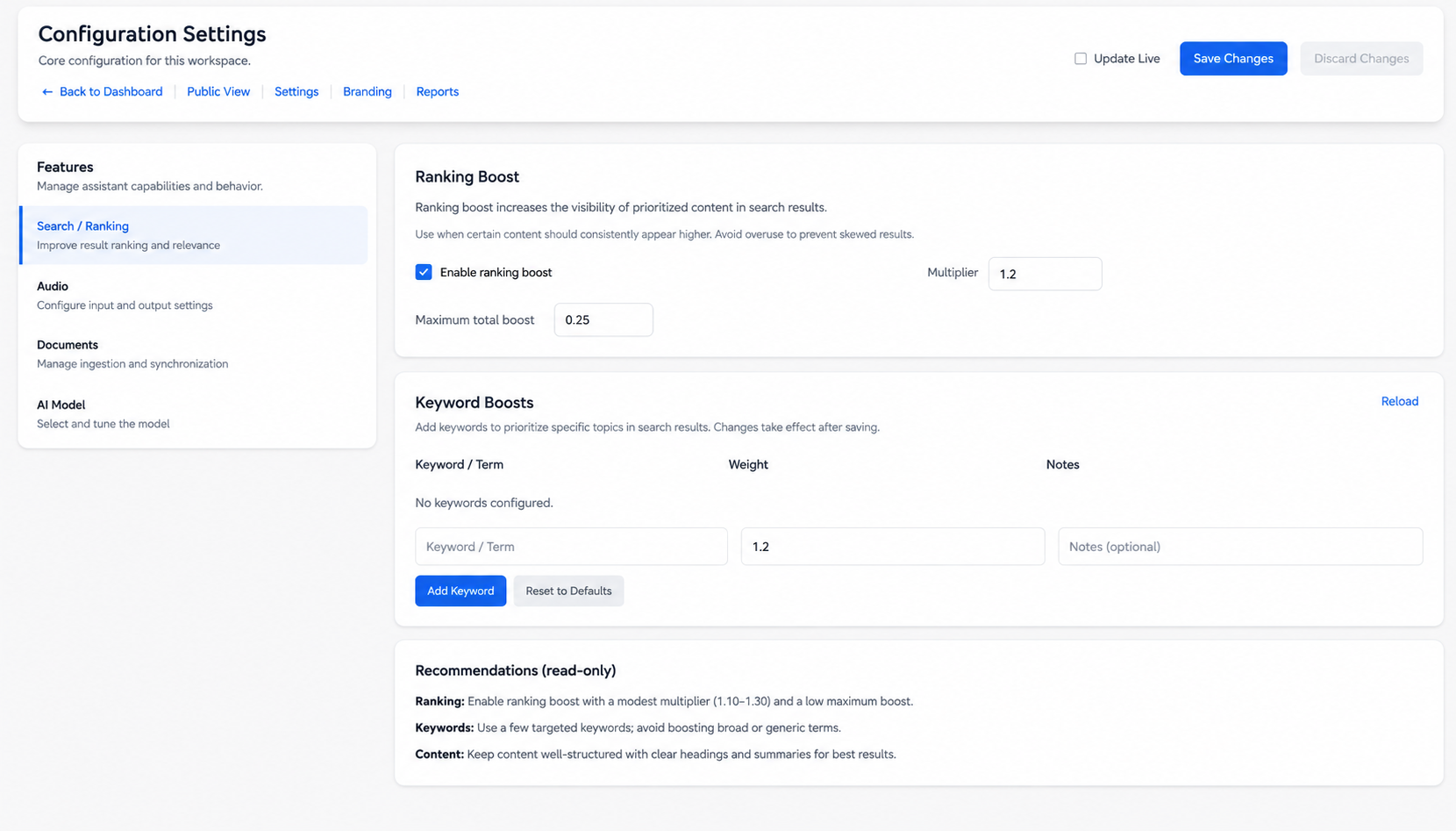
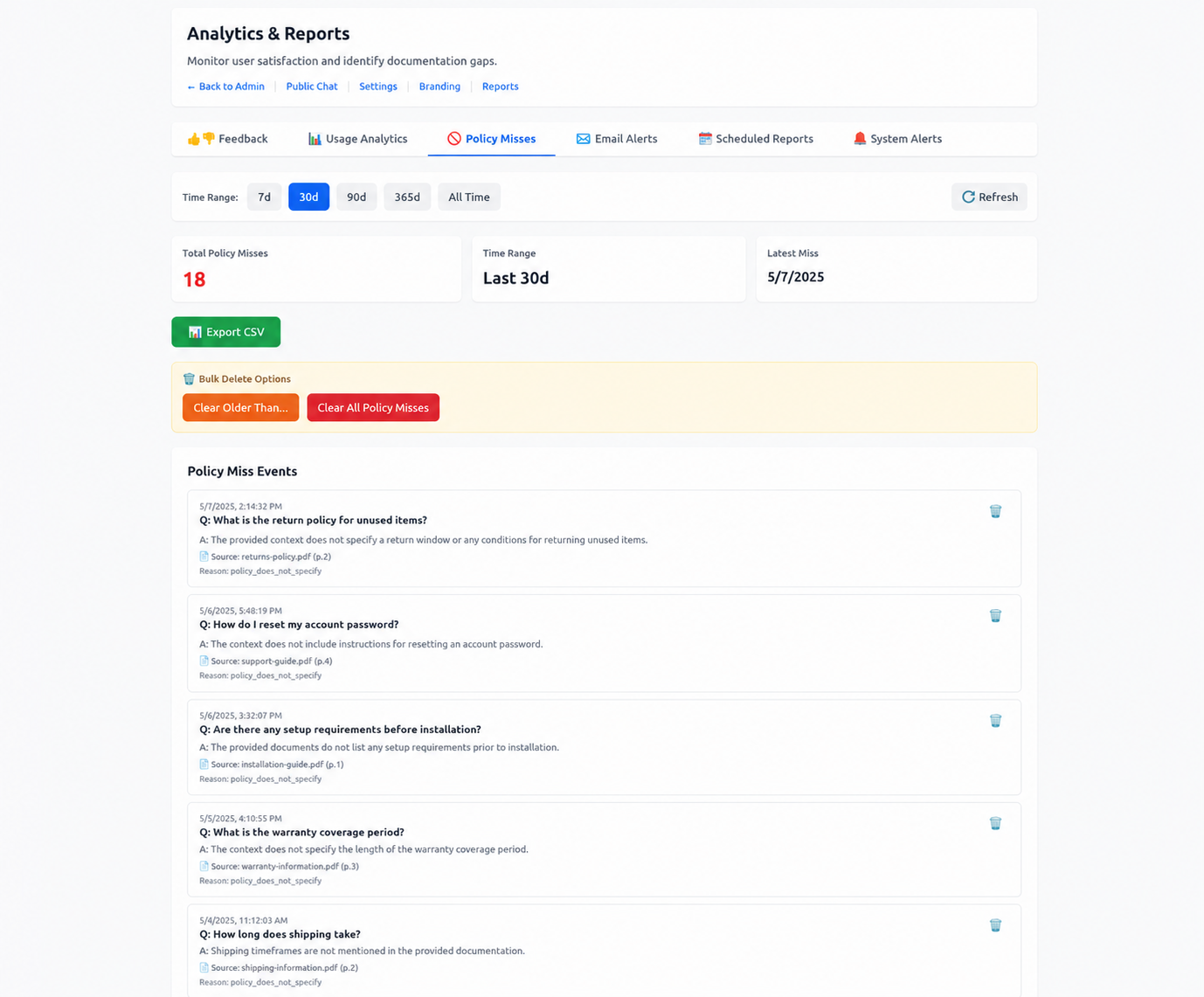
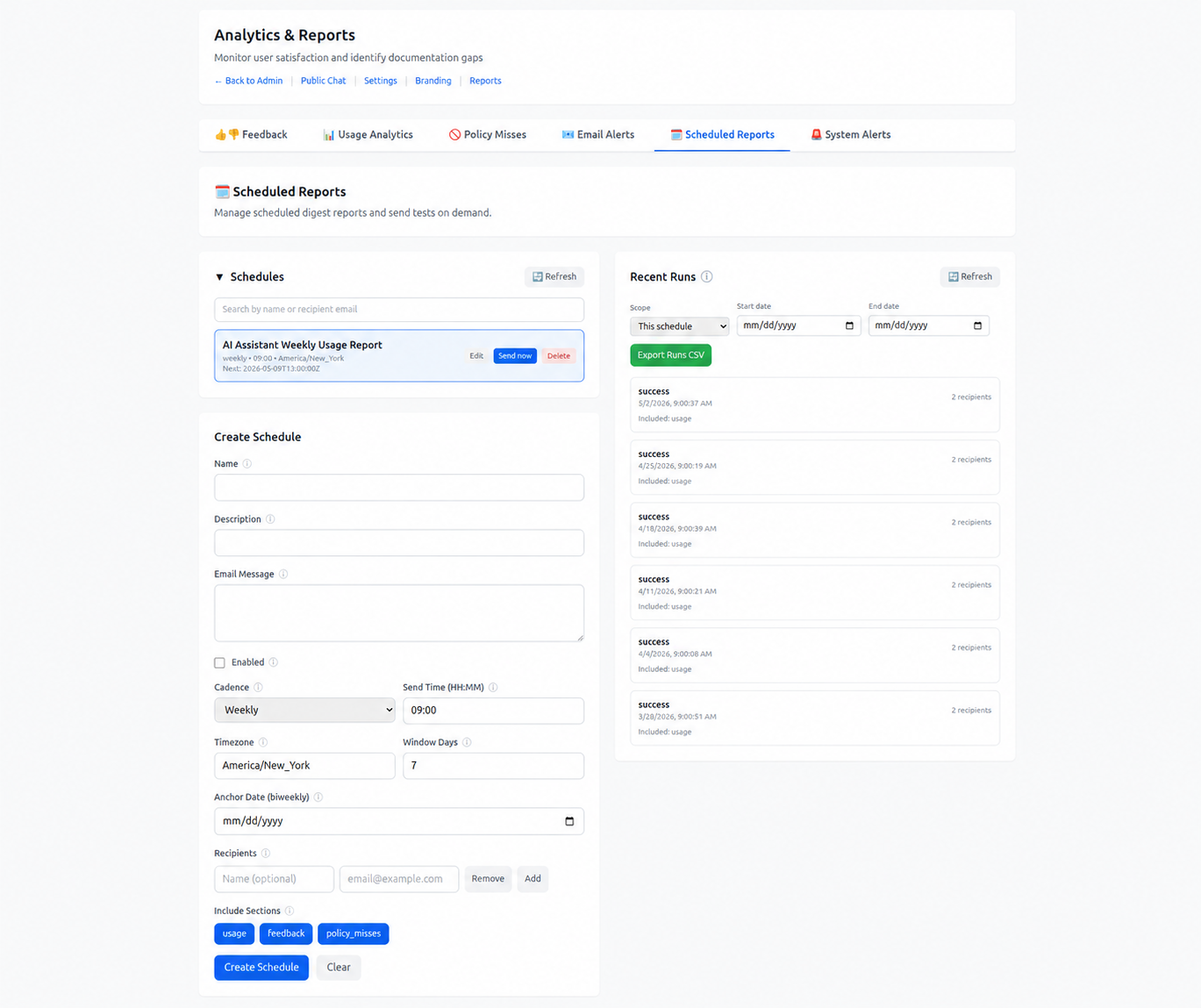
These screenshots use sample content. Contact us to review the workflow with your own document set.
Admin controls and reporting
Administrators can manage how LuxonLink looks, ingests documents, answers questions, and reports on usage.
Branding and interface controls
Set the assistant name, company name, tagline, empty state text, input placeholder, logo fields, favicon fields, typography, colors, chat bubble styling, layout, backgrounds, shadows, glow, and avatars. Preview the experience for desktop and mobile before publishing.
Document ingestion controls
Upload files, manage document folders, ingest approved URLs, configure max tokens, follow internal links where appropriate, set allowed paths, define depth limits, and trigger automatic indexing.
Answer and model controls
Choose supported models, adjust temperature and max tokens, tune document chunks and top-K retrieval, select response format, set system prompt or assistant personality, and use customer-provided API key support where applicable.
Analytics, reports, and alerts
Track total messages, conversations, average messages per conversation, average response time, activity by hour, day, week, month, and quarter, feedback, source usage, policy misses, scheduled reports, recipient management, recent report runs, and alert rules.
Brand the assistant for your organization
LuxonLink can be configured to feel like part of your internal knowledge environment.
Identity and copy
Set the assistant name, company name, tagline, empty state text, input placeholder, logo fields, and favicon fields so employees understand what the assistant is for.
Visual styling
Configure typography, colors, chat bubble styling, layout, backgrounds, shadows, glow, and avatars to match your organization's internal style.
Desktop and mobile preview
Preview the assistant experience across desktop and mobile views before rolling changes out to employees.
Secure document answers and access controls
Built for businesses that take data security seriously
☁️ Fully Managed by xillix
Secure SaaS with no installation required:
- Hosted and maintained by xillix
- Enterprise-grade security and uptime
- Automatic updates and maintenance
- Access via secure web interface
Your documents are encrypted, isolated, and never used for training.
🔐 Department Isolation
Fine-grained access control:
- HR employees see only HR documents
- IT sees only IT documentation
- Sales sees sales playbooks and product info
- Admins control who sees what
Role-based permissions enforce your organizational structure.
📝 Audit-Friendly Citations
Full traceability for compliance:
- Every answer is logged with timestamp
- Source documents and page numbers recorded
- User identity tracked (for internal deployments)
- Export logs for compliance audits
Perfect for regulated industries that need documentation.
🚫 No Training on Your Data
Your intellectual property stays yours:
- We never use your docs to train AI models
- Your data is encrypted and isolated per customer
- Full data portability—export anytime
- Delete your data completely on request
This isn't a promise—it's how our system is architected.
Not just answers — a system that improves over time
Most AI tools give answers. LuxonLink shows you what your company doesn’t know.
Every interaction is tracked, helping you understand what employees are asking, where answers are unclear, and which questions go unanswered. This creates a continuous improvement loop for your documentation.
What employees are asking
See the actual questions your team is asking. Discover what topics come up most, how activity changes over time, and where your documentation needs to be stronger.
Where answers are unclear
Identify responses that receive negative feedback or low-confidence scores so you can improve the underlying documentation.
Which questions go unanswered
Surface gaps in your knowledge base before they become recurring problems. Repeated questions, unanswered topics, and unclear answers can become a practical backlog for documentation owners.
Full visibility into usage
LuxonLink tracks how your system is used so you can improve it over time.
📊 Questions and activity
See questions asked by employees, timestamps, and usage patterns across your organization.
📄 Source documents used
Track which documents are driving the most answers so you know what your team relies on most.
📈 Response performance
Understand how well your system is performing and where responses may need tuning or documentation updates.
This gives leadership and administrators a clear view into how knowledge flows across the organization.
See what your documentation is missing
LuxonLink captures feedback and detects policy misses, unclear answers, and missing source material.
👍 User feedback
Employees can rate responses with thumbs up or down. Feedback is tracked so you know which answers are trusted and which need improvement.
🔍 Unanswered or unclear questions
Detect when LuxonLink cannot fully answer a question from the indexed documents. These policy misses can signal that documentation is missing, outdated, or not specific enough.
📋 Missing or non-specific policies
Review reason codes such as missing policy or non-specific policy, along with the source documents used, so documentation owners know what to clarify.
📤 Exportable gap reports
Export policy misses, repeated questions, source usage, and feedback for review. Scheduled reports can summarize usage, feedback, and documentation gaps for recipients.
Reporting and exportable data
All interactions can be reviewed for analysis, auditing, or improvement.
📝 Conversation and source review
Review conversations, timestamps, source documents used, response times, and the context needed to understand how employees are using the system.
📤 CSV export
Export conversations, feedback, source usage, and policy-miss reports to CSV for deeper analysis, compliance review, or sharing with leadership.
📧 Scheduled reports and alerts
Set up weekly scheduled reports with usage, feedback, and policy-miss sections. Manage recipients, review recent run history, and configure alerts for scheduler, backend, or policy-miss spikes.
Tune retrieval for your documents
Administrators can tune how LuxonLink ingests documents, ranks content, and returns answers.
⚙️ Model and answer controls
Select supported models, set temperature and max tokens, tune document chunks and top-K retrieval, choose response format, and adjust system prompt or assistant personality.
🎯 Policy and keyword boosts
Prioritize approved content with policy boosts, boost multipliers, max total boost limits, keyword boosts, and version-aware ranking so current guidance can surface more reliably.
📄 OCR and table extraction controls
Configure OCR behavior, table extraction, image-only page handling, URL ingestion, allowed paths, internal-link following, and depth limits to support complex document sets.
🔄 Reindexing and version updates
When documents change, administrators can trigger reindexing to keep answers aligned with the latest approved content and document versions.
Department access controls for real business environments
LuxonLink is deployed per department or use case when needed.
🔒 Data stays isolated between teams
Each department runs from its own controlled knowledge base. HR content does not mix with IT runbooks, and sales material stays separate from compliance documentation.
🏢 Separate instances for sensitive teams
When stricter separation is required, departments can be deployed as independent instances — each with its own documents, access controls, and reporting.
☁️ Fully managed by xillix
No software to install, no servers to manage. xillix handles hosting, updates, and maintenance so your team can focus on using the system, not running it.
Multi-department pricing is available for organizations scaling across teams. Contact us to discuss your structure.
Business impact
LuxonLink reduces time spent searching, improves consistency, and gives organizations visibility into their knowledge systems.
⏱️ Faster answers for employees
Employees get direct answers from approved documents instead of spending time searching through folders, inboxes, and shared drives.
📉 Fewer repeated questions
HR, IT, and operations teams spend less time fielding the same questions when employees can self-serve from an accurate, up-to-date knowledge system.
✅ More consistent information
Responses stay grounded in approved content, reducing conflicting answers across teams and improving trust in internal guidance.
🔍 Clear insight into documentation gaps
Usage data and feedback reveal where your documentation is weak or missing so you can improve it before it becomes a recurring problem.
Pricing
See plans and details for this product.
Includes 5 GB of storage. Additional storage available in 5 GB increments for $50/month per block. Blocks are stackable with no limit.
Monthly plans renew automatically and can be canceled any time before the next billing cycle. Annual plans renew automatically and must be canceled at least 30 days before renewal.
Try the Live Demo
Experience LuxonLink in a safe sandbox with sample documents.
Compare LuxonLink
See how LuxonLink stacks up against common alternatives.
LuxonLink vs Confluence
Instant answers with governance versus documentation-only workflows.
Read comparisonRelated Resources
- AI Knowledge Base for Instant Answers
- Company document Q&A software
- Internal AI chatbot for business teams
- AI document search with citations
- Reduce Support Tickets with AI
- AI knowledge base for HR policies
- AI runbook assistant for IT and operations
- AI HR policy assistant use case
- AI runbook assistant for IT teams
- AI policy Q&A for compliance teams
- LuxonLink vs Notion AI
- LuxonFlow for customer-facing AI chat with human handoff
- What Is AI Business Automation?
- AI vs Manual Work
- AI Customer Support Statistics
- AI Statistics: What Businesses Are Seeing
- How AI Automation Works
See how LuxonLink works with your data
Schedule a demo to see how LuxonLink can turn your company's documents into a structured, measurable knowledge system.
Schedule a Demo